Explore how ERP AI chatbots turn natural-language questions into ERP queries, retrieve business data, and provide useful answers in real time.
When someone on your team needs a quick number from your main business software, they rarely log in themselves. Instead, they take the path of least resistance: they ping someone on Slack or Teams, open a ticket with IT, or find the one department member who can navigate the system.
The data is sitting right there, but getting it out is so painful it taxes every task your team tries to do. The very system you bought to be your single source of truth becomes your biggest bottleneck.
An ERP AI chatbot flips this. You put a simple messaging layer on top of your existing system. It understands what your team asks in plain English, pulls the answer, and hands it back, replacing a manual scavenger hunt with a simple question.
What an ERP AI Chatbot Does
An ERP AI chatbot is an intelligent interface that uses natural language processing and machine learning to interact with your ERP data. It sits on top of your ERP system and helps people get things done using simple messages instead of complex menus, acting as a conversational layer over your ERP data and workflows.
Modern chatbots go beyond simple command responses. They're context-aware assistants grounded in your specific ERP data, whether that's customer records, financial transactions, or supply chain metrics. Think of it as a translator that makes your ERP speak plain English, so your people stop memorizing arcane procedures or navigating dozens of screens.
A Conversational Interface for Your ERP
An ERP AI chatbot serves as a bridge between users and their ERP data, allowing for natural language interactions and automating tasks and queries. It harnesses AI technologies like Natural Language Processing (NLP) and machine learning to give your team a simple chat window to talk to your company's most tangled databases.
For staff, this can involve requesting scheduling information, finding supporting documentation, or creating a summary of data buried across many systems. Instead of hunting through menus and trying to remember that one 12-click sequence to pull a specific report, they just ask for what they need. Any employee can retrieve information and execute commands as simply as talking to a colleague, which unlocks the full potential of your ERP.
Translating User Requests into ERP Actions
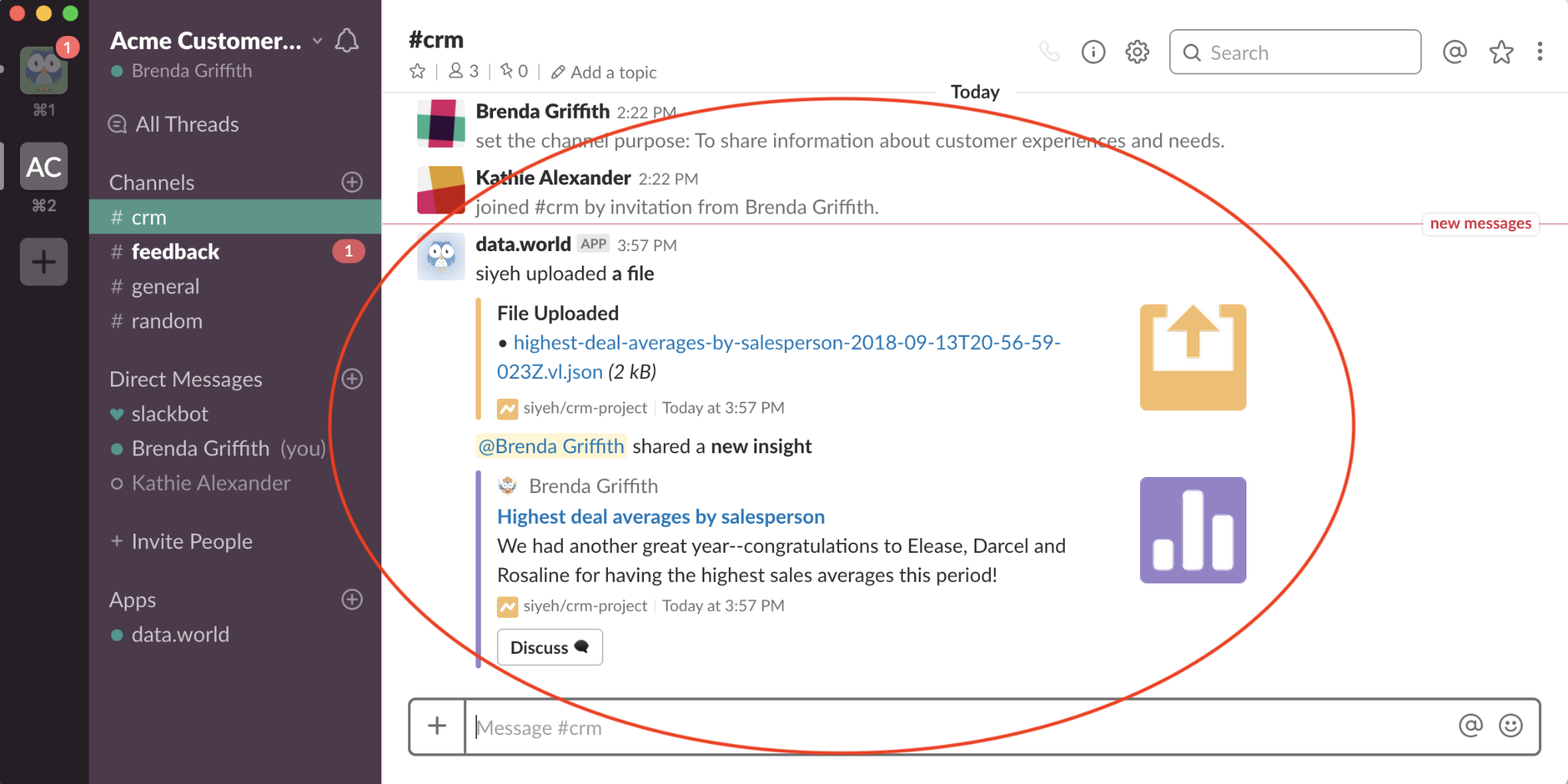
Here is how the process works. A user opens a chat tool like Teams or Slack and types or speaks a prompt. The software uses Natural Language Processing (NLP) to figure out what the person wants, then securely pulls the raw information from your databases using Application Programming Interfaces (APIs), and a Large Language Model (LLM) helps make sense of it.
The bot also tracks the ongoing conversation context, so it gives better answers as you go. If your request is vague, it asks for more details to get things right. Once it has what it needs, it organizes the data, builds a chart if that makes sense, and gives you a complete answer conversationally: a quick summary with a graph, not a raw data dump.
Understanding AI Agents vs. Simple Chatbots
The difference between an AI agent and a simple chatbot is retrieval versus synthesis. A basic bot is like a library clerk: you ask for a specific book by name, and it fetches that exact book. An AI agent is like a research assistant. You give it a general topic, and it locates various references, distills the critical arguments, and recommends further reading without being micromanaged.
What Is The Difference Between ERP AI Chatbots, Ml And RPA?
To better understand AI in ERP and ERP AI chatbots, it's important to distinguish between the different automation technologies available to businesses. Each plays a unique role in enhancing efficiency and streamlining operations. Here's a quick breakdown of their differences.
Now, let’s say you’re a customer service manager at a retail company. Here’s how each technology uniquely contributes to your workflow:
ERP AI Chatbot: It acts as your first point of contact, quickly answering questions like, “How many orders were placed last month?” This interaction is user-friendly and helps you access information without searching through reports.
Machine Learning (ML): While the chatbot helps with inquiries, ML analyzes patterns in return data to identify trends, such as which products are frequently returned. This insight informs your inventory decisions and helps prevent future issues.
Robotic Process Automation (RPA): Once orders are processed, RPA takes over by automatically entering order details into the ERP system. This reduces manual work, minimizes errors, and frees up your team to focus on enhancing customer engagement.
In this scenario, the ERP AI chatbot shines as a vital tool for quick interactions, allowing employees to easily access information.
Unlike machine learning (ML) (which analyzes data for insights), and robotic process automation (RPA) (which handles repetitive tasks), the chatbot engages users in a conversational way. This user-friendly approach not only improves efficiency but also helps staff make quicker decisions.
While ML and RPA support the overall process, the ERP AI chatbot is essential for daily operations. It connects complex data with user needs, making it an invaluable resource for enhancing business performance.
The Role of AI Chatbots In ERP Systems
With AI-powered ERP chatbots developing so quickly, it’s easy to see just how much they’re helping businesses work smarter. Let’s take a closer look at how these AI chatbots are really transforming ERP systems:
Streamlining data access and reporting
AI chatbots make accessing data in ERP systems super simple. Instead of sifting through endless reports and dashboards, you just ask for what you need, and the chatbot pulls real-time data for you. This means faster access to the info that matters, without all the hassle.
Improving user interaction and decision-making
AI chatbots enhance ERP systems by using NLP to process plain-language commands. Instead of navigating complex menus, users input queries like “Show inventory status.” The chatbot interprets this, retrieves the relevant data, and provides it instantly. This speeds up workflows, reduces errors, and improves decision-making by simplifying data access and task execution.
Reducing human error and manual tasks
AI chatbots in ERP systems automate repetitive tasks such as data entry, order processing, and report generation, significantly lowering the risk of human error. By using pre-defined algorithms, chatbots ensure accuracy in real-time data validation and transaction processing. This automation cuts down manual intervention, which reduces input errors by up to 30% and increases operational efficiency.
Pros and Cons of ERP AI Chatbots
Now that we’ve looked at how AI chatbots fit into ERP systems, let’s break down the pros and cons of using them. Here’s a quick and simple comparison to help you see both the benefits and the challenges:
Pros
Cons
✔ Enhances system scalability by handling increased volumes of data easily
✔ Provides instant insights for better forecasting and planning
✔ Reduces the need for extensive ERP training due to chatbot assistance
✔ Improves customer and internal support by offering real-time solutions
✔ Frees up IT and support teams by handling basic tasks and inquiries
✘ Requires continuous training and updates to stay accurate and effective
✘ May struggle with highly specialized queries outside predefined tasks
✘ Dependency on internet connectivity for cloud-based chatbots
✘ Initial chat bot setup can be time-consuming with a steep learning curve
✘ Some employees may prefer human interaction, reducing chatbot adoption
When ERP AI chatbots may not be the best fit?
While ERP AI chatbots bring a lot of benefits, they’re not always the perfect solution for every business. For highly specialized industries or teams that prefer human interaction, chatbots might fall short. Plus, if your company has limited IT infrastructure or needs heavy customization, setting up and maintaining a chatbot can be tricky. Sometimes, sticking to more traditional tools or a hybrid approach could be a better fit!
Why Getting Simple Data from an ERP Is Slow
Getting a simple answer out of your ERP feels like pulling teeth because the software forces your people through hours of training just to do basic lookups, and even then it's slow. Many fall back on old spreadsheets or bug a coworker who knows the system. This is a design flaw in how people talk to the software, and it costs you a fortune in hidden productivity.
Providing Instant Answers to Business Questions
Your best people are rarely at a desk. They're on a client call, walking the warehouse floor, or out in the field, and they need answers now. A sales rep shouldn't have to call back to the office to check on stock. They should be able to type into Slack or WhatsApp, "Is SKU 837 in stock at the Atlanta hub?" and get an immediate reply.
Inventory data is usually buried inside software built for accountants, not for your frontline crew. Nobody managing a busy warehouse floor is going to stop, pull out a laptop, log in, and navigate a dozen menus to check one thing. Putting the answers inside the chat tools they already use gives them speed without sacrificing accuracy.
Use Case: Real-Time Inventory and Shipment Tracking
The AI acts as a translator. When a user asks how much Pepsi is at Mall X, the bot figures out the right product codes and location IDs, pings the database for the live number, and translates the raw data back into a plain English answer: "We have 1,254 cases right now."
This scales to bigger logistics challenges. H&M uses conversational AI to monitor its entire distribution network, letting logistics teams and customers get instant shipping updates instead of digging through old reports. Because the info is live, delivery estimates get more precise and response times accelerate.
Use Case: On-Demand Financial Reports for Leaders
Your leadership team can get key financial numbers sent to them without logging into a clunky accounting platform. A manager asks, "Show last month's marketing spend," and the AI replies that spending totaled $142,000, with events making up the largest portion. It might follow up with, "Want a full category split?" This avoids the typical multi-day wait while finance pulls a custom report.
Philips connects these AI assistants to its management systems to help executives get quick updates on critical KPIs by text, which sharpens operational awareness and accelerates strategic choices.
Quantifying the Time Savings
The time savings here are measurable. A 2025 study in the HaUI Journal of Science and Technology paired a GPT-4 based virtual assistant with inventory tracking databases and found:
Research tasks that used to take 10 to 15 minutes now finish in under 1 minute.
Simple lookups for live stock levels come back in under 10 seconds.
The total stock verification process saw a 35% reduction in completion time.
When you remove the friction between your people and your data, you buy back your team's most productive hours.
How Repetitive Tasks Overwhelm Your Team
The hours you buy back are buried under repetitive work: data lookups, status checks, and pulling the same report every Monday. Your most talented people run this loop instead of using the skills you hired them for. The fix is to find predictable, high-volume work and give it to a machine. Start by identifying any low-value task that eats up more than five hours of a single person's week.
Automating High-Volume, Low-Value Work
Getting this work off your team's plate is one of the most direct ways to fight burnout. For a people operations team, it means letting software handle the predictable 80% of administrative noise, which frees your pros to focus on the messy 20% of cases that need real judgment, empathy, and problem-solving.
Joint research from Salesforce and Vena Solutions found that 88% of workers feel more fulfilled in their jobs when technology takes over the boring, mundane parts.
Use Case: Handling Supplier Payment Inquiries
Accounts payable departments are constantly buried in vendor messages about payment timelines and transaction status, which creates a bottleneck for accounting staff. According to the Ardent Partners Accounts Payable Metrics that Matter in 2023 report, the average AP team spends 22.5% of its time just dealing with supplier inquiries.
The HSO PayFlow Agent, built using Microsoft's Model Context Protocol (MCP), plugs into your system, scans incoming messages from merchants, answers their status questions, and updates your Dynamics ERP databases on the spot. It also evaluates situational nuances like 'pay when paid' terms.
This same approach helped GE Vernova cut its corporate authorization bottlenecks. They rolled out intelligent chat tools to handle billing queries at scale, which let their financial specialists resolve actual merchant disputes faster.
Use Case: Automating Leave Requests and HR Queries
The same high-volume pattern hits HR, but the questions come from inside the company. Coca-Cola uses intelligent conversational tools tied to their enterprise software to handle internal requests automatically, which drops the number of HR helpdesk tickets that need a person.
The tool gives instant, correct answers pulled straight from the source and enables rapid self-service for thousands of global staff. The real win is that the HR team gets its time back for strategic projects instead of playing human search engine for vacation-day balances.
Reducing Manual Entry Errors with Guided Conversation
A chatbot turns data entry into a conversation instead of a screen with 20 fields. It asks "What was this for?", then guides the user through the date and a photo, checking things as it goes. Because the tool hooks directly into your ERP, it instantly validates each entry against your real chart of accounts or project codes, so typos, duplicates, or missing info get flagged right away, not discovered by a stressed accountant weeks later.
When you clean up the data going in, the data you get out for reports and analytics gets more reliable. You make the process easier and the system trustworthy, which gets to the heart of why your team avoids it.
Overcoming Low ERP Adoption and Poor User Experience
Your team avoids the ERP because it's a nightmare to use, and avoiding it is a logical choice. When software buries simple tasks under a dozen confusing menus and cryptic steps, people find an easier way, even if it's a messy spreadsheet or a rogue Google Doc. Low adoption is a product design failure.
A Simple Interface Anyone Can Use
A chatbot works because it speaks your team's language. Employees query corporate databases using normal phrasing, the same way they'd ask a coworker for information. There are no seven-step click-throughs to memorize or search codes to look up. The chatbot acts as a clarifying shield over intricate ERPs, hiding the system's complexity from the user.
This means anyone, not just a handful of power users, can get what they need from the database. The old requirement to master the system's search syntax vanishes.
Use Case: Accessing ERP Data from Slack or Teams
Put the tool where your team already works. Constantly switching between your chat app and the ERP kills productivity, so plugging an assistant directly into Slack or Microsoft Teams lets your people ask questions and get data without breaking focus. These tools can also connect to platforms like WhatsApp.
Instead of a five-minute scavenger hunt, a user types @ERPAssistant what's the status of PO #450012? right into a Teams channel. The bot replies that the order from Global Tech Inc. for $15,250.00 has shipped, is due October 26, 2023, and provides the tracking number 1Z999AA10123456789. All the key information arrives in seconds, without leaving the conversation.
Essential Features of an ERP AI Chatbot
The most important features are the ones that make the chatbot a trustworthy, secure extension of your team. You're looking for a key to unlock the system you already have, so your evaluation should focus there. Group the features by priority:
Priority
Feature
What to check
Must-have
Role-Based Security
Uses the exact permissions already set in your ERP; creates no backdoor to sensitive data
Must-have
Real-Time API Access
Pulls live data from your system, not stale copies
Must-have
NLU & Intent Recognition
Distinguishes a question from a command; handles the same query phrased three different ways
High priority
Transactional Capabilities
Lets the bot write or edit data, not just read it; ask how it verifies data before saving
High priority
Contextual Conversation
Remembers what you were talking about from one question to the next
Nice-to-have
Multi-System Integration
Good for phase two or three, not day one
Nice-to-have
Continuous Learning
Same, defer until the core works
Security is the bedrock. If the chatbot creates a backdoor to sensitive data, it's a non-starter. For NLU, a simple test is to ask a vendor to show you the same query phrased three different ways; if it gets confused, walk away. When a vendor gets excited about the nice-to-haves, file them away for later. You're looking for a tool that securely unlocks the system you've already paid for.
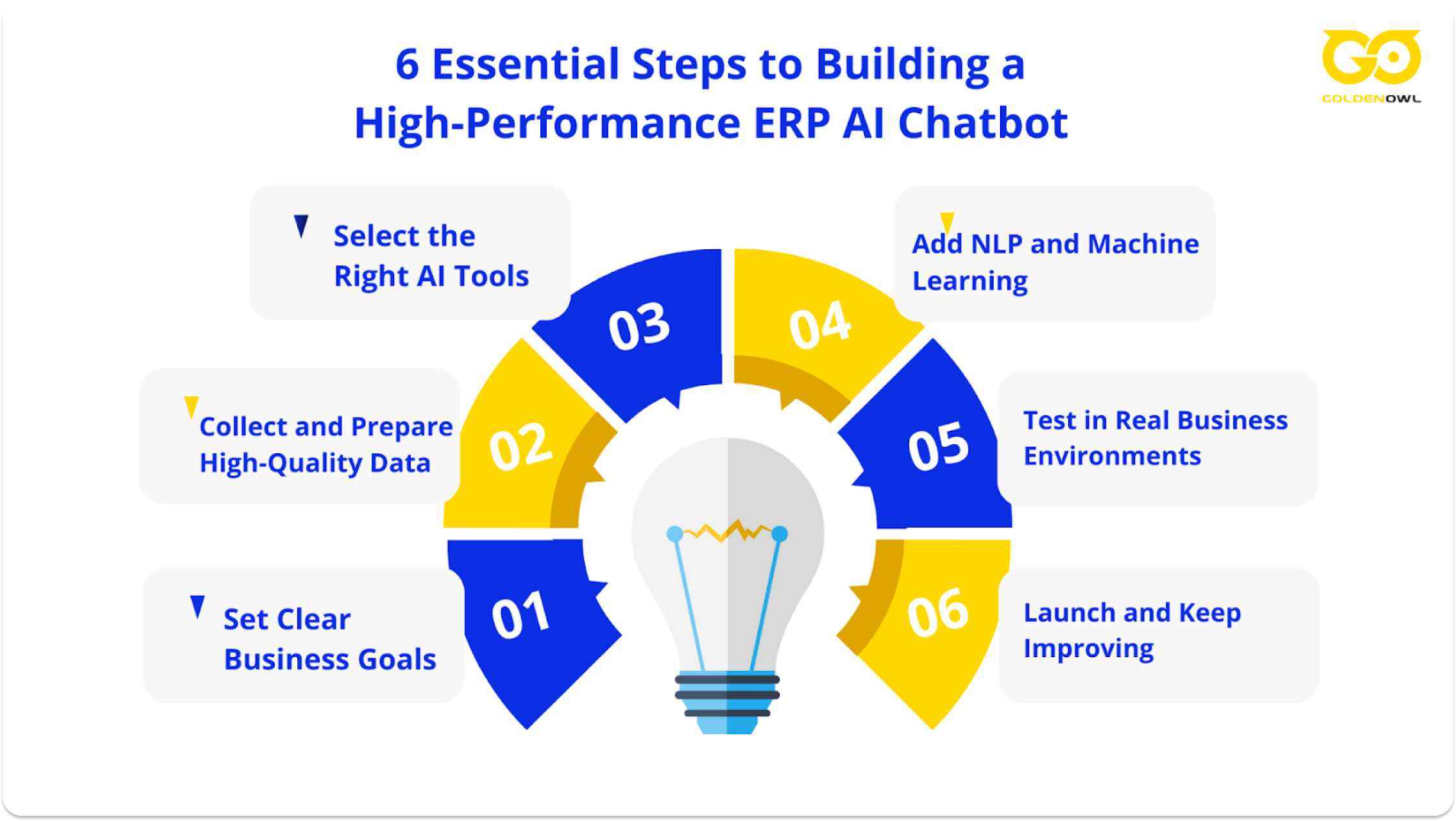
6 Essential Steps to Building a High-Performance ERP AI Chatbot
If you’re planning to implement an ERP AI chatbot for your business, having a well-structured plan is crucial to its success.To help you get started, here’s a step-by-step guide to help your chatbot integrate smoothly and perform efficiently within your ERP system.
Step 1: Set clear business goals
Before diving into development, it's crucial to define what you want your chatbot to achieve. Ask yourself questions like:
Do I want the chatbot to handle customer inquiries, automate reporting, or process transactions?
What KPIs (Key Performance Indicators) will measure its success?
Clearly defined goals will guide the chatbot’s design and help align its functions with your business objectives. A chatbot built to solve specific problems will always outperform a generic one.
Step 2: Collect and prepare high-quality data
AI chatbots rely heavily on data to function properly. This step involves gathering relevant data from your ERP system and making sure it’s clean, organized, and up-to-date. Think about the following:
Customer data, like previous orders or inquiries
Inventory data, if your chatbot will handle stock-related queries
Transaction records for order processing Make sure the data is structured and labeled clearly, as quality data is the backbone of any AI-driven system. Inaccurate or incomplete data will lead to unreliable chatbot performance.
Step 3: Select the right AI tools
Now that you’ve set your goals and prepared your data, it's time to choose the right AI tools for your chatbot. There are various AI frameworks and platforms available, such as:
Google Dialogflow: Great for natural language processing (NLP) and voice interaction.
IBM Watson: Known for handling complex AI tasks and easy integration with ERP systems.
Microsoft Bot Framework: Ideal for businesses already using Microsoft's ecosystem
Select a platform that fits your technical needs and integrates seamlessly with your existing ERP system. You might also want to consider factors like scalability, ease of use, and support for the latest AI advancements.
Step 4: Add NLP and Machine Learning
To make your chatbot truly powerful, you’ll need to integrate Natural Language Processing (NLP) and Machine Learning (ML). Here’s what to focus on:
Train the chatbot using common questions: Feed it FAQs or common business queries so it can respond accurately from day one.
Enable continuous learning: Make sure your chatbot can learn from user interactions, improving its performance as it gathers more data. You don’t have to be an AI expert to implement these features, but working with a development team that understands NLP and ML is a must.
Step 5: Test in real business environments
Before launching your chatbot, it’s essential to test it in real-world scenarios. Run a pilot in a controlled environment, focusing on areas such as:
User experience: Is the chatbot easy to interact with?
Data accuracy: Is it pulling the right information from the ERP system?
Task automation: Is it handling tasks like data entry or report generation smoothly?
Collect feedback from employees or customers and refine the chatbot based on their input. Testing should also include stress testing—seeing how the chatbot performs under heavy usage.
Step 6: Launch and keep improving
Once you’re confident in its performance, it’s time to launch your ERP AI chatbot. However, the work doesn’t stop here. Post-launch, you’ll need to:
Monitor KPIs: Keep an eye on those business goals you set in Step 1.
Update the AI regularly: As new business processes or data come in, your chatbot should be updated to handle them.
Collect feedback: Continuous feedback loops from users will help identify areas for improvement.
How to Plan and Deploy Your First ERP Chatbot
Success in deployment comes from surgical precision, not a flashy attack on every problem at once. Building a conversational assistant for your ERP takes a real understanding of how your teams work and where they get stuck. Most teams go wrong by trying to solve everything at once instead of fixing one leaky pipe.
Start with One High-Friction Process
Pick a small, painful, specific problem to solve first. Instead of "making sales reporting better," build a tool that lets regional reps check current stock levels for your top 20 products. That's measurable. To keep the tool accurate and reliable, restrict the assistant to 5 to 10 distinct operational scenarios.
Good starting points are well-known workflows that make everyone groan, like Procure to Pay, Order to Cash, or Hire to Retire. You can also pick one high-volume department like AP, or identify the business unit that fields the highest volume of identical support tickets. To find your starting point, follow the frustration: where do employees regularly send emails to check on an order or document? Those choke points show where your assistant is needed most.
Defining Scope for Read-Only vs. Transactional Access
Start with read-only access. It's safer and smarter. Letting people only look up information delivers immediate value and builds trust, while dramatically lowering the risk of the bot writing bad data back into your main system. Plan a transactional phase later, but only after you've seen people using the tool and proven it's accurate.
Different tasks need different permission levels. Many queries just pull data. Some can safely trigger a background process. For a handful of critical actions, you might want a human to manually approve the change before anything gets written to the database.
Choosing an Architecture: Embedded vs. Third-Party
Your architecture choice is a trade-off between speed and flexibility. The built-in features that come with your ERP are fast to turn on but limited in what they do. For businesses that need more flexibility, ERP software development can provide a more tailored approach, while external platforms offer a wider range of capabilities but require more work and money to set up.”
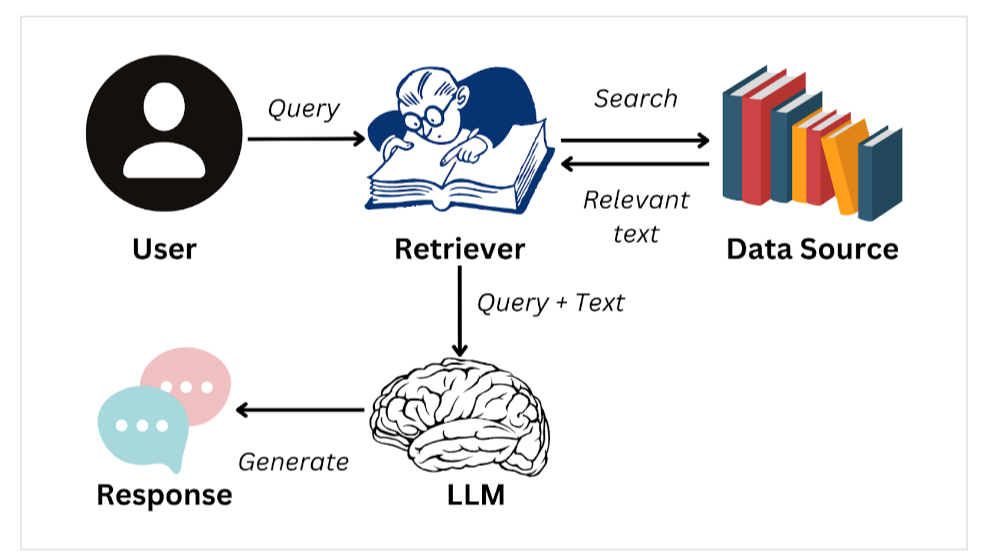
For complex setups, external tools use retrieval-augmented generation (RAG) to pull information from multiple sources. Because RAG can tap into storage hubs, OData/API layers, or mirrored reporting databases, it acts as a bridge between separate systems. This lets you connect your ERP, CRM, and various data lakes into one chat interface, answering a question that needs data from two places at once.
Test with a Pilot Group Before Full Rollout
Validate the chatbot with a small pilot group before a company-wide launch. Launch the tool for a handful of dedicated users and watch how they actually use it. If the software doesn't solve their problem, it's not ready.
Monitor for specific signs of failure, not just bugs:
Questions that trigger confusion or that users phrase in ways the bot can't parse.
Answers that are consistently wrong or inaccurate.
Spots where people keep getting locked out by permissions.
Dive into the interaction logs and usage data to find these friction points, then fix them. Keep tweaking until the tool is undeniably useful.
Key Integration Patterns and Security Rules
Your chatbot's security model must be an exact copy of your ERP's security. The bot is a new face for the user: it gets all their permissions and all their restrictions, with zero changes. Any vendor who tells you it's more complicated than that, or suggests a "clever" shortcut, is waving a red flag.
Connecting Securely via APIs
A bot must talk to your ERP through the front door, using proper, secure APIs or a dedicated middleware layer. It must never run direct SQL commands against your database. For big platforms like SAP or Oracle, use their standard, secure connection points such as OData, authorized BAPI/RFCs, or REST microservices. Going around these controlled gateways invites data leaks or a scrambled database.
Wiring the chatbot directly to a bunch of database tables turns into a slow, tangled mess that's a nightmare to maintain. A dedicated middleware layer is better. It acts as a smart translator, taking the user's request and figuring out how to talk to the core database cleanly.
If you're running an older system without modern APIs, you'll need to build secure software bridges yourself. This is a significant task. It takes careful setup to turn a person's casual question into a precise command the system understands, and it's not a one-time project: as your business rules change, you'll have to update these custom connections.
Enforcing Existing ERP Roles and Permissions
The chatbot is a direct stand-in for the person using it. It must inherit their exact permissions from the ERP, no exceptions. If an employee isn't allowed to see salary data in the ERP, they can't ask the chatbot for it either. This is the only way to guarantee confidential information stays confidential.
If a vendor suggests bypassing your core permissions to make setup "faster," show them the door. That's a sign they don't understand enterprise-grade security. You also can't let a machine learning model "estimate" financial entries without solid business rules behind it.
To spot this problem, ask vendors one direct question: "Does the chatbot use its own 'super admin' account, or does it run every action using the logged-in employee's specific permissions?" The only acceptable answer is that it acts on behalf of the user. A single, all-powerful account for the bot is a lazy, unnecessary security risk.
Building Fallbacks for When the Bot Fails
A great tool is built for the real world, where things break. When an error happens, the bot explains the problem in plain English instead of spitting out a cryptic error code. If an API connection drops or an approval gets rejected, the bot recommends an alternative path. If it truly can't complete a task, it passes the whole conversation, with all its context, to a human.
Part of reducing errors is knowing when not to guess. If the bot isn't confident it understands the request, it should ask for clarification or say, "I'm afraid I don't know." Honesty beats a confident, wrong answer. Enterprise systems aren't perfect: connections time out and approvals get stuck, so your assistant must manage these hiccups without crashing or confusing the user.
Common Pitfalls and How to Avoid Them
Treating this project as a simple technology purchase sets it up to fail. A chatbot brings real wins, but it also opens a new set of operational problems that need constant, non-technical attention. Get honest about the hidden obstacles in your data, security, and user workflows before you start.
Poor Data Quality Leads to Bad Answers
Data quality is the number one project killer. A chatbot is a window into your records, not a magic janitor that cleans up a decade of messy data. If your employees don't trust the numbers in the ERP today, a chatbot won't fix that. It serves up the same flawed answers at lightning speed.
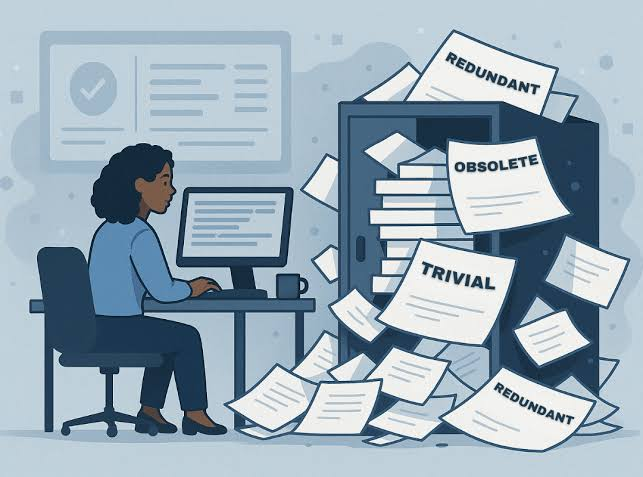
Cleaning out your ROT data (Redundant, Obsolete, and Trivial files) is critical. Teams skip this thinking the AI will figure it out, but junk data is exactly what causes the AI to hallucinate. An AI trained on old product SKUs, closed customer accounts, or test entries that never got deleted will confidently present terrible recommendations as fact.
Underestimating Security and Governance Needs
Your chatbot can't become a security backdoor. It must inherit every user permission and data access rule from your ERP, no exceptions. Before you launch, confirm that a sales manager can't ask for payroll data and an accounts payable clerk can't pull up sensitive HR reviews. Without granular, role-based control, you're building a compliance bomb.
Ignoring User Adoption and Change Management
This project lives or dies on user trust. If your team doesn't trust the data in the ERP right now, because it's out of date or wrong, they won't trust a chatbot that pulls from the same source. They'll keep double-checking its answers against their own spreadsheets, which defeats the purpose. Your new assistant becomes another source of noise they work around.
A Quick Data Health Check
Run a quick data health check before you commit to anything. It takes no more than 30 minutes and covers three things:
User trust. Talk to 3 to 5 active business users in departments like AP or inventory. Ask them to have the system answer a few regular questions, like "Is invoice #12345 cleared?" or "What's our current stock on this item?" and see if they trust the answer.
Data consistency. Pull 10 random records for different customers or suppliers and check them on every screen in the ERP. Key fields like system IDs and transaction statuses should match everywhere.
Data freshness. Check when your most important tables, like inventory or new orders, were last updated. Verify that all sync jobs complete successfully and that responses are drawn from a single, authoritative source of truth.
Use Microsoft Power BI to spot blank fields or Microsoft Excel Power Query to check on file extractions. This diagnostic tells you a lot about the real work ahead.
Success Stories of ERP AI Chatbot Implementation
Now that you have a clear roadmap for building a high-performance ERP AI chatbot, it's helpful to see how others have successfully implemented similar solutions. Here are two real-world success stories that showcase the impact of ERP AI chatbots in business operations.
Case study #1: Heineken - Streamlining procurement with SAP AI
Heineken transformed its beer production and procurement processes by integrating an AI chatbot into its SAP ERP system. The manual procurement tasks previously led to a 30% error rate and delays in managing orders for key brewing ingredients like hops and barley. After implementing the AI chatbot, the company saw rapid improvements:
Error rates dropped from 30% to 5%, ensuring higher accuracy in procurement data.
Procurement order processing time decreased by 300%, streamlining operations and helping scale beer production efficiently.
Vendor onboarding time reduced from months to weeks, enhancing supplier relationships and securing essential ingredients faster.
This AI-driven ERP chatbot helped Heineken optimize its global beer production by automating critical procurement tasks, significantly reducing errors, and improving supply chain efficiency
Case study #2: Unilever - Optimizing HR with Odoo ERP Chatbot
Unilever enhanced its HR processes by integrating the AI chatbot Una into its Odoo ERP system. Una automates key tasks like responding to employee queries, managing payroll, and onboarding. This has led to:
40% faster response times for HR-related inquiries.
A 30% reduction in HR workload, enabling the team to handle more employees without increasing staff.
Unilever’s AI-powered HR chatbot not only sped up everyday tasks but also enhanced employee satisfaction, giving the company room to grow efficiently without adding more HR resources.
The Future: Autonomous ERP Agents
The future moves beyond a slicker interface into agents that run entire processes on their own. The agent handles the boring, everyday decisions and only loops you in when something looks off.
For example, an agent could handle standard material purchases from a list of approved vendors. As long as the price is what you'd expect, the order goes through. If a vendor suddenly jacks up the price, the agent flags it and sends it to a manager for sign-off.
These agents become the single place where work gets done, bridging your new cloud tools and the clunky old system you can't get rid of yet. Your ERP fades into the background as an invisible utility, so your team focuses on their actual jobs instead of wrestling with software.
Leverage ERP AI chatbots with Golden Owl Solutions
At Golden Owl Solutions, we combine the power of ERP with AI chatbots to automate and streamline business processes like inventory, customer service, and procurement.
Our custom ERP AI chatbots solutions are designed to optimize workflows, minimize errors, and offer real-time insights that drive smarter decision-making. Whether you’re looking to boost productivity or scale operations, our team provides innovative solutions tailored to your business needs.
Bottom line
ERP AI chatbot is revolutionizing business processes by automating routine tasks, improving accuracy, and enhancing decision-making. With Golden Owl Solutions, you can leverage ERP development and AI to optimize your operations and achieve scalable success.
Share this page
Table of Content
Subscribe to Golden Owl blog
Stay up to date! Get all the latest posts delivered straight to your inbox
Instead of relying on slow manual audits, retail AI vision solutions scan visual feeds from overhead cameras, display shelving, and digital product listings to trigger immediate operational fixes.